 Rui Carmo
This is a fascinating box–so much so that after almost three weeks playing with it, I amassed so much material that I nearly decided to split my review into two parts, but in the end I decided to condense it a bit and post a longer piece than usual, even if that means almost half of it is a fairly wide-ranging exploration of how to get AI workloads on it.
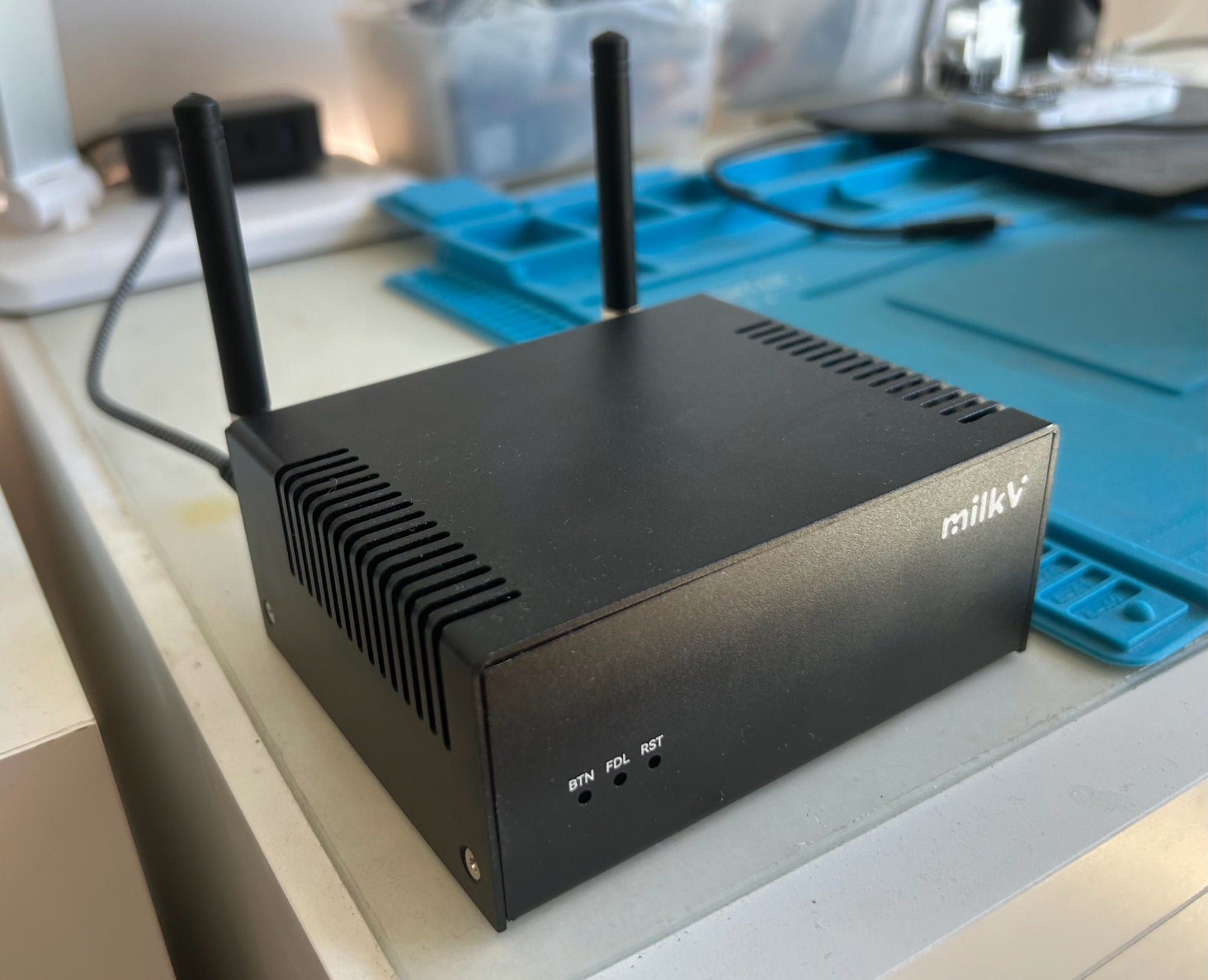
Spoiler: We’re tantalizingly close to having usable non-GPU inference on SBCs, and surprisingly enough, RISC-V is more interesting than ARM right now.
I’ve tested a lot of ARM boards over the past few years, but only a couple of RISC-V machines–and the MilkV Jupiter 2 is quite a substantial system: Sixteen cores (with a twist), a refreshingly roomy 32GB of RAM, a 10GbE SFP, Wi-Fi 6, a GPU with actual DRM nodes, all in a Pico ITX form factor.
Disclaimer: my contacts at Radxa supplied me with a Jupiter 2 free of charge, and as usual, this article follows my review policy.
On paper, this is the first RISC-V board that doesn’t feel like a science project.
In person, and unlike most of the SBCs I get, the Jupiter 2 is a finished product, and came in a neat little box, fully assembled and contained in an unassuming metal case with external antennae as the only extra parts. No power brick, but since it has a USB-C PD port, I had zero trouble powering it from one of my monitors.
Hardware
After some careful disassembly, the board itself is pretty dense: 1× DP out, 1× eDP ribbon, 1× USB-C PD power input, 3× USB-A 3.0, 1× GbE RJ-45, 1× 10GbE SFP+ cage, an M.2 slot and what looks like a second M.2 for storage. There are also MIPI/eDP ribbon connectors I haven’t tested.
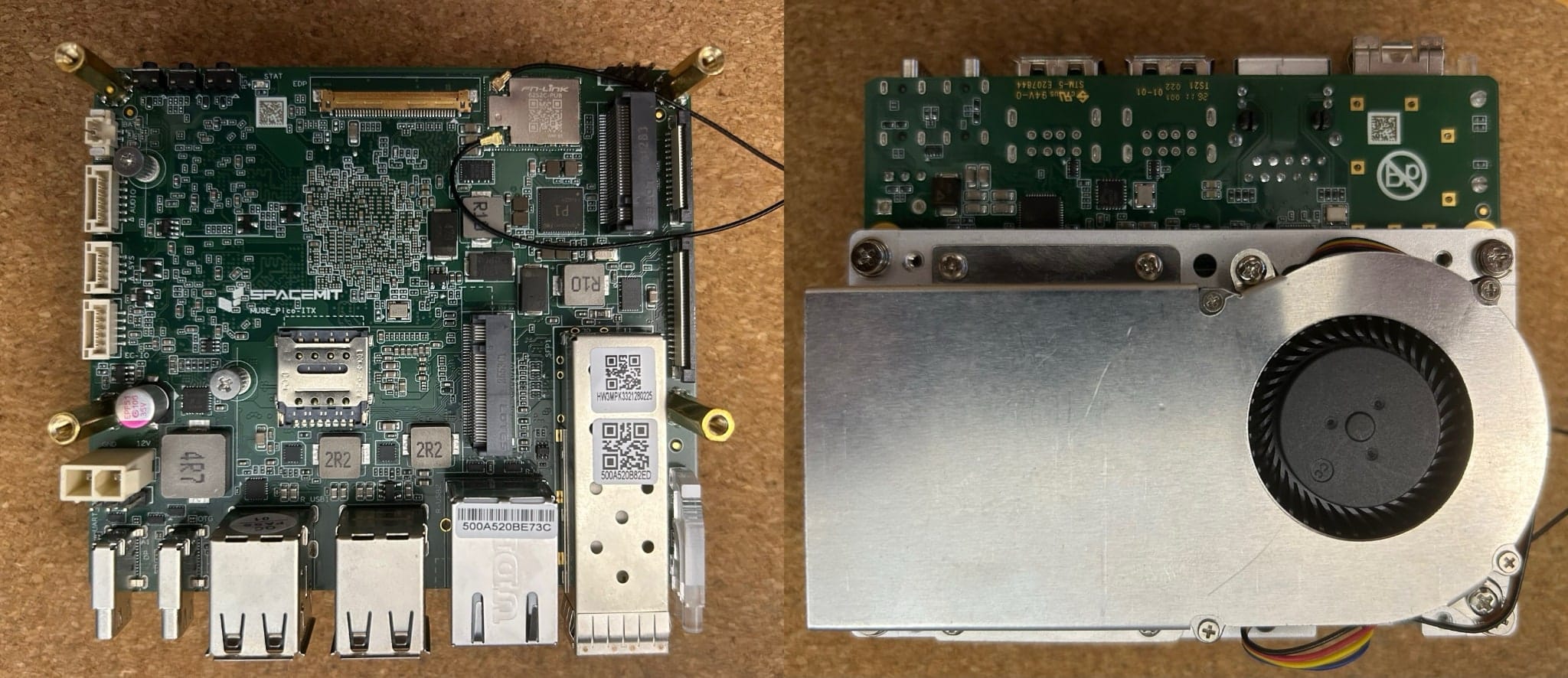
The SoC is SpacemiT’s K3–a big.LITTLE style arrangement with 8×A100 cores at 2GHz and 8×X100 cores at 2.4GHz, which makes it the first RISC-V chip I’ve handled that has asymmetric core clusters. And since there are a few other devices out there with the same reference design, I will henceforth refer to the Jupiter as the K3 for short.
Specs
The machine I’m testing has a nice assortment of features:
- 16 RISC-V cores (8× Spacemit A100 + 8× Spacemit X100)
- 32GB RAM
- 128GB UFS
- RTL8852BE Wi-Fi 6 + Bluetooth
- 1 GbE RJ-45 + 10 GbE SFP (RTL8127 10GbE via PCIe)
- An IMG (PowerVR) GPU
- NOR flash for bootloader (SPI, 8MB: bootinfo + FSBL + env + eSOS + OpenSBI + U-Boot)
- PWM fan
- Pico ITX form factor
The ISA
If you’ve never come across SpacemiT’s stuff before (I had only a bare inkling of the K1), I heartily recommend the public SpacemiT K3 documentation and their GitHub repository since the architecture is laid out there, and it was fairly easy to get a high level grasp. In particular, the K3 SoC datasheet has a pretty good overview:
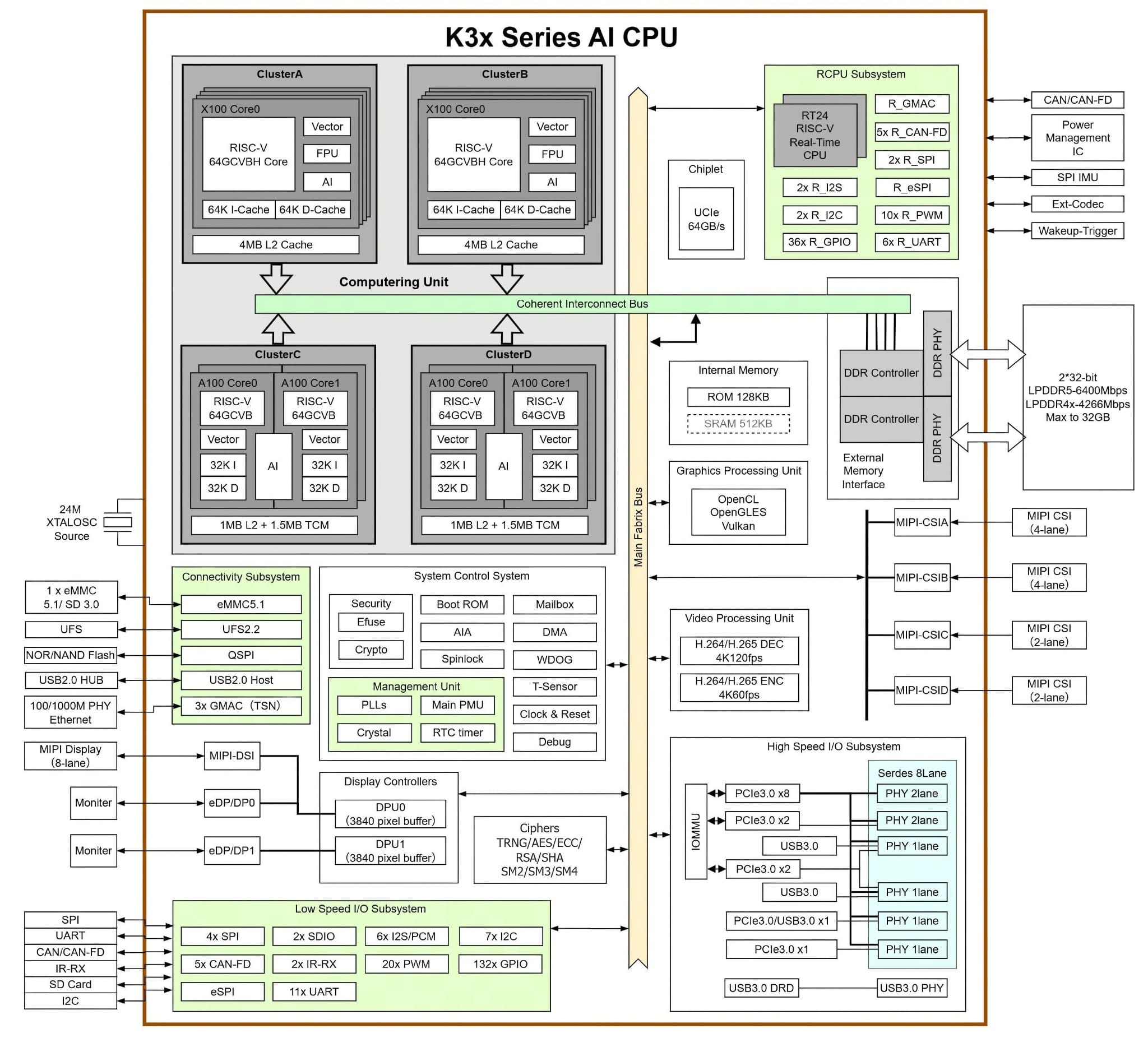
A key thing that needs to be taken into account is that the A100 cores are fundamentally different from the X100 ones. They have extended vector instruction sets, dedicated transactional memory, and, well… AI.
That documentation also seems to be the original source of the marketing claims that the K3 provides 60 TOPS of AI compute and can run 30B models at over 10 tokens/s. Well, sort of– as another spoiler, I can share that I hit a hard cap at an effective 3B (which seemed to be the practical limit), but we’ll get there…
Hardware Info
The board identifies itself as “SpacemiT K3 Pico ITX” in the device tree, and cores are reported like so:
Architecture:                            riscv64
Byte Order:                              Little Endian
CPU(s):                                  16
Vendor ID:                               0x710
Model name:                              Spacemit(R) A100
  Thread(s) per core:                    1
  Core(s) per socket:                    8
  CPU max MHz:                           2000.0000
  CPU min MHz:                           614.4000
Model name:                              Spacemit(R) X100
  Thread(s) per core:                    1
  Core(s) per socket:                    8
  CPU max MHz:                           2400.0000
  CPU min MHz:                           614.4000
L1d cache:                               1 MiB (16 instances)
L1i cache:                               1 MiB (16 instances)
L2 cache:                                10 MiB (4 instances)
One of the nice things about this box is that it comes with a 10GbE Realtek NIC. I wasn’t able to test that at full speed yet since my 10GbE interfaces are all in my server closet, but the 802.11ax reported below worked flawlessly with my Wi-Fi 6 setup:
# lspci
0000:00:00.0 PCI bridge: SpacemiT X100 PCIe Root Complex (rev 01)
0002:00:00.0 PCI bridge: SpacemiT X100 PCIe Root Complex (rev 01)
0002:01:00.0 Ethernet controller: Realtek Semiconductor Co., Ltd. RTL8127 10GbE Controller (rev 08)
0004:00:00.0 PCI bridge: SpacemiT X100 PCIe Root Complex (rev 01)
0004:01:00.0 Network controller: Realtek Semiconductor Co., Ltd. RTL8852BE PCIe 802.11ax Wireless Network Controller
There isn’t a lot to report on the USB front (most of the below is what is plugged into my LG Ultrafine):
# lsusb
Bus 005 Device 002: ID 043e:9a46 LG Electronics USA, Inc. USB2.1 Hub
Bus 005 Device 003: ID 043e:9a48 LG Electronics USA, Inc.
Bus 005 Device 004: ID 043e:9a42 LG Electronics USA, Inc. USB Audio
Bus 005 Device 009: ID 046d:085e Logitech, Inc. BRIO Ultra HD Webcam
Bus 005 Device 010: ID 043e:9a40 LG Electronics USA, Inc. USB Controls
Bus 007 Device 004: ID 04d9:0006 Holtek Semiconductor, Inc. Wired Keyboard
Bus 007 Device 005: ID 093a:2510 Pixart Imaging, Inc. Optical Mouse
The flash storage it ships with is also sensibly organized:
# lsblk
NAME        SIZE TYPE MOUNTPOINT MODEL
sda       119.3G disk            TY7B-128
├─sda1      256M part
├─sda2      256M part /boot
└─sda3    118.8G part /
mtdblock0     8M disk
mtdblock1   128K disk
mtdblock2   512K disk
mtdblock3    64K disk
mtdblock4     1M disk
mtdblock5   384K disk
mtdblock6   5.9M disk
That sda (model TY7B-128) initially fooled me into thinking it was a SATA SSD–but there’s no SATA controller on this board, and the 3.4 GB/s reads I measured later are well past anything SATA III can do (~600 MB/s). It’s actually 128GB of onboard UFS, which rides the kernel’s SCSI layer and so enumerates as sda exactly like a SATA disk would (NVMe would be nvme0n1, eMMC mmcblk*). The mtdblock devices are the 8 MB NOR flash partitions (bootinfo, FSBL, env, eSOS, OpenSBI, U-Boot).
# sensors
pwmfan-isa-0000
Adapter: ISA adapter
pwm1: 60% MANUAL CONTROL

thermal_cluster3-virtual-0
Adapter: Virtual device
temp1: +60.0°C

thermal_cluster1-virtual-0
Adapter: Virtual device
temp1: +60.0°C

thermal_gpu-virtual-0
Adapter: Virtual device
temp1: +63.0°C

thermal_top-virtual-0
Adapter: Virtual device
temp1: +62.0°C

cros_ec-isa-000c
Adapter: ISA adapter
fan1: 3208 RPM

thermal_cluster2-virtual-0
Adapter: Virtual device
temp1: +63.0°C

thermal_cluster0-virtual-0
Adapter: Virtual device
temp1: +64.0°C

thermal_vpu-virtual-0
Adapter: Virtual device
temp1: +60.0°C
The sensors output is a bit weird, but it does cover all the CPU cores (A100 are clusters 0 and 1, X100 are 2 and 3). And I will have a bit more to say about the fan.
But I’m ahead of myself here–these were gathered after plugging it in, obviously, and it’s worth rewinding and going over that part:
First Boot
This was a first-class experience, and I wish all SBCs worked this way: I plugged the DP port into my ancient LG Ultrafine, powered on the monitor, and got a Bianbu first-boot wizard in less than 5 seconds after the initial logo.
Clicked through it–language, timezone, user account–and landed on a working accelerated desktop. That’s it. No GRUB patching, no DTB hunting, no resize-filesystem bugs, no serial console required. The smoothest first boot I’ve had with an SBC all year.
The board ships with Bianbu 4.0 (“Resolute Raccoon”)–a Debian-based distribution from SpacemiT, which, unlike most ARM boards I’ve used recently, is actually running a modern 6.18.3 kernel.
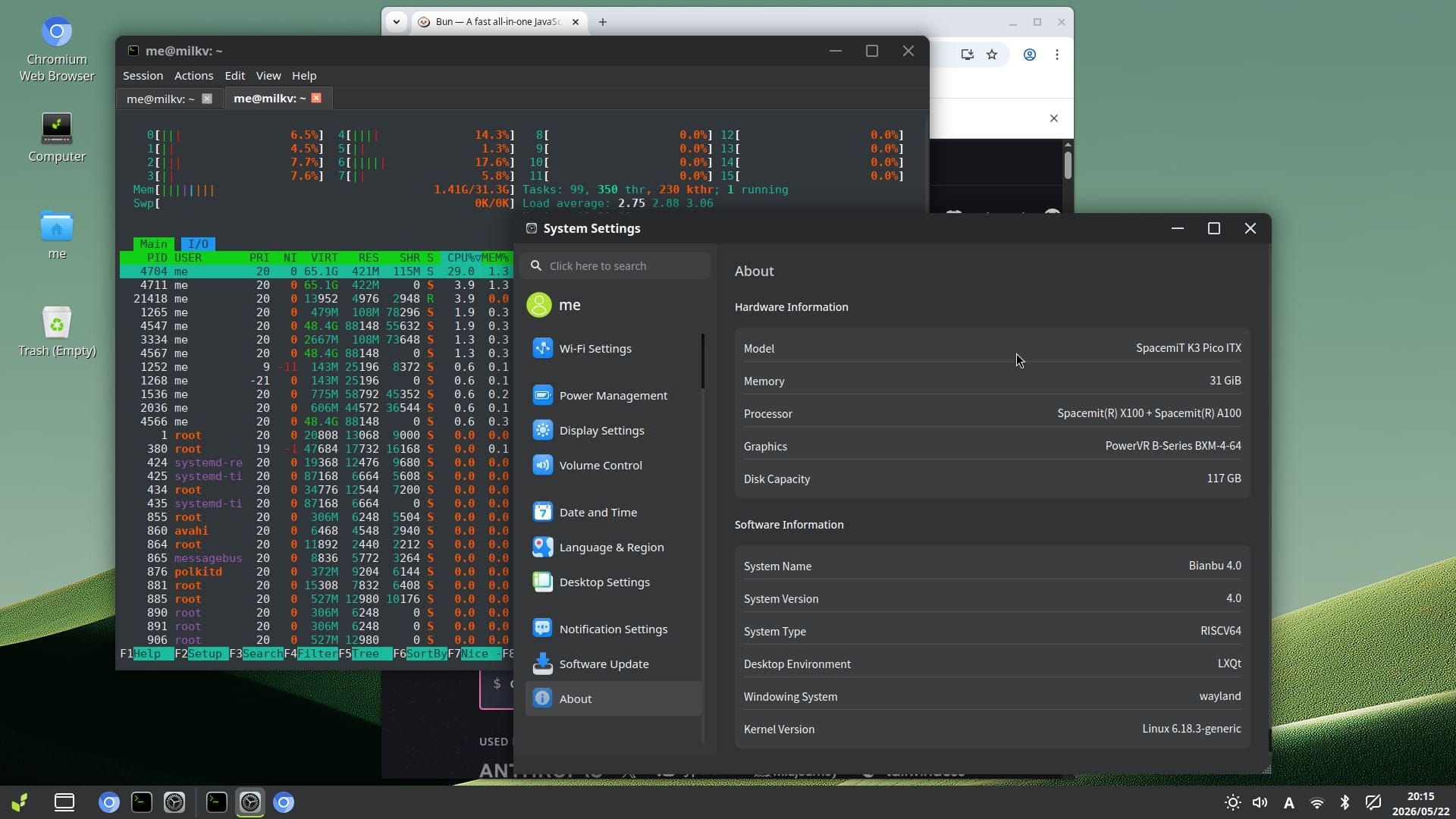
The desktop runs LXQt on Wayland, SDDM as the display manager, and the whole thing felt responsive enough that I didn’t immediately reach for the terminal. That is not something I say about SBC desktops often, and even though I then spent most of the past three weeks accessing it via ssh, I would likely have zero issues using it.
Standard apt works (repos seem to be at spacemit.com), Debian toolchain is present, and the kernel command line includes some interesting RISC-V-specific hints: unaligned_scalar_speed=fast and unaligned_vector_speed=fast, which I think are related to the RVV extended vector instruction set and the way the kernel does thread allocation.
I dug around a bit more and the boot chain goes through NOR flash (OpenSBI + U-Boot) → UFS, which is cleaner than the SD-card-based setups on most SBCs I’ve tested, and it was able to update itself without any issues:
Setting up spacemit-ec-firmware (1:0.0.22)… spacemit-ec-firmware: payload installed successfully. Current EC firmware 'SPACEMIT_PICO_ITX-V00.14' is older than packaged firmware 'SPACEMIT_PICO_ITX-V00.16'. Starting automatic EC firmware update during package installation...

[INFO] Automatic EC firmware update triggered during package installation.
[INFO] Current RW: SPACEMIT_PICO_ITX-V00.14
[INFO] Target FW : SPACEMIT_PICO_ITX-V00.16
[WARN] Do not remove power, reset the system, or interrupt the tool while flashing.
[INFO] 1. Erasing flash region... Erasing 262144 bytes at offset 0... done.
[ OK ] Erase completed.
[INFO] 2. Writing firmware image... Reading 242688 bytes from /lib/firmware/k3-pico-itx/ec.bin... Writing to offset 0... Writing: [########################################] 100% done.
[ OK ] Write completed.
[INFO] 3. Reading back flash contents for MD5 verification... Reading 242688 bytes at offset 0... Reading: [########################################] 100% done.
[ OK ] MD5 verification passed.
[ OK ] Automatic EC firmware update finished successfully.
[INFO] This reboots the EC firmware only. Linux is not rebooted automatically.
[WARN] The power LED may blink and ectool may be unavailable briefly after the command.
[INFO] Sending EC reboot command...
[ OK ] EC reboot command sent.
[INFO] Waiting 10 seconds for EC reboot to settle...
[WARN] Reboot Linux manually now to restore EC communication.
[INFO] After Linux reboots, verify with: ectool version Automatic EC firmware update completed.
Not UEFI, but compared to the U-Boot-on-SD-card experience that most ARM SBCs inflict on you, having a proper NOR flash boot chain with OpenSBI → U-Boot → onboard UFS is a step up, because it means you can brick the OS partition and still recover without reflashing an SD card on another machine (and yes, Rockchip, I’m looking at you).
And since it all worked out of the box, I did not try adding an NVMe (there’s an M.2 M-Key slot for one) or booting from it (yet), although since there is official Ubuntu support I fully intend to try that out in the future.
Toolchains
Developer tooling for RISC-V will be foremost on most of my readers’ minds, so I can tell you right away that I am currently making extensive use of these:
- GCC 15.2 (riscv64)
- Go 1.25.7 – works out of the box, which is significant for me
- Python 3.14.3
- Make 4.4.1
Sadly (for me), Bun isn’t available, since there’s no official riscv64 build available yet, but node works OK. I focused mostly on Go, though.
Performance
To get started, I ran a small battery of tests to get a feel for where this sits relative to the Orange Pi 6 Plus (CIX P1, 12 ARM cores) I’ve been living with for months.
CPU
| Test | MilkV Jupiter 2 (16× RISC-V) | Orange Pi 6 Plus (12× ARM) | Notes |
|---|---|---|---|
| 7-Zip multi-thread | 17,547 MIPS | 42,346 MIPS | ARM is 2.4× total |
sysbench CPU (1 thread) |
2,329 ev/s | 2,800 ev/s | ARM 1.2× per-core IPC |
sysbench CPU (all cores) |
16,980 ev/s (8 usable) | 25,746 ev/s (12t) | 7.3× vs 9.2× scaling |
| fib(42) GCC -O2 | 1.110s | 0.649s | ARM 1.7× faster |
| Go 50M trig ops | 2.68s | 0.483s | ARM 5.5× (Go arm64 mature) |
| Python 10M loop | 4.74s | 1.07s | ARM 4.4× |
Note that these benchmarks only ran on the X100 cluster (cores 0–7). The A100 cores (8–15) are kernel-fenced for AI work–htop shows them sitting idle, and sched_setaffinity silently refuses to pin anything there from a normal shell. The reasons for that are various and fascinating, and I’ll get into them below.
The sysbench single-thread number is the interesting one here: 2,329 versus 2,800. That’s only a 1.2× gap per X100 core. The 7-Zip figures (17.5k vs 42.3k MIPS) look damning until you realize that the A100 cores weren’t used at all, so the Jupiter 2 is really running 8 general-purpose threads against the P1’s 12.
The real gap shows up in Go and Python (4-5×), which probably says more about how young the riscv64 runtime backends are than about the hardware itself.
Memory Bandwidth
| Test | MilkV Jupiter 2 | Orange Pi 6 Plus (A720 best) |
|---|---|---|
| sysbench memory read | 3,051 MiB/s | 15-17 GB/s (libc memcpy) |
| sysbench memory write | 2,694 MiB/s | 35-47 GB/s (memset) |
I went back and ran this in parallel on the CIX P1, and the K3’s memory bandwidth is much lower–roughly a fifth for reads. This is likely the biggest single performance gap and puts an upper cap on whatever the CPU can do regardless of how much it packs into each cycle. For inference workloads that are memory-bound, this matters a lot. The K3 has a few workarounds, though, as we’ll see later.
Storage
| Test | MilkV Jupiter 2 |
|---|---|
| Sequential write | 1.2 GB/s |
| Sequential read | 3.4 GB/s |
| 4K random write | 113 MB/s (~28K IOPS) |
The built-in UFS storage is very nice–NVMe-class speeds, better than what I saw on the Orange Pi 6 Plus’s NVMe setup with my own (underused) PCIe 4 SSD. No complaints here.
Thermals under Load
The board stays well-behaved under sustained 8-core stress-ng:
- Idle: 59-64°C, fan at 45% / 2335 RPM
- Full load (30s sustained): 62-68°C, fan ramps to 60% / 3194 RPM
- No throttling observed, which made my usual CPU/thermal charts kind of pointless
Again, stress-ng --cpu 0 ran on the 8 available X100 cores, but even when I ran both CPU and AI loads that used the A100 cores, the fan was audible but not objectionable–noticeably quieter than the Orange Pi 6 Plus’s cix-ec-fan in quiet mode, and the fan controller API is much saner.
Since I had a few tussles with the Orange Pi 6 Plus’s fan controller limitations, I let an LLM loose on /sys/devices, and it found out that the Jupiter’s fan is managed by a CrosEC controller over eSPI (/sys/devices/platform/soc/cac8c000.espi/84000000.ec). That exposes a standard hwmon interface with fan1_input and (surprisingly) fan1_fault that standard Linux utilities can read (and the built-in cooler does seem to have the right number of wires to provide fan sensing, which is a nice touch).
There’s also a separate pwm-fan platform device at /sys/devices/platform/pwm-fan/hwmon/hwmon8/pwm1 that accepts values 0-255 for direct duty-cycle control, with pwm1_enable=1 when thermal management is active, with a pwm-fan cooling device linked to thermal_zone0. In practice, you never need to touch any of this–the board keeps itself at 60-68°C under sustained load with the fan barely audible, even when using all 16 cores and at an ambient temperature of nearly 28°C in my office.
Power Consumption
I stuck a USB PD power monitor between the PSU and the K3, and the figures were pretty stable: 11W idle, an oddly symmetrical 22W under load. I suspect using an SFP for networking will add significantly to that, but most of my testing was actually done by ssh over Wi-Fi.
GPU
Unlike the Orange Pi 6 Plus, where the GPU required driver rebinding and vendor package archaeology, the Jupiter 2’s PowerVR GPU works out of the box.
No module loading, no blacklisting, no package hunting. I ran vulkaninfo and got a conformant Vulkan 1.3 device on the first try, although I am not sure how far I can go with Vulkan compute on this board yet since I explored other avenues.
The hardware is an IMG PowerVR B-Series BXM-4-64 MC1, and Vulkan reports it cleanly:
deviceName = PowerVR B-Series BXM-4-64 MC1driverID = DRIVER_ID_IMAGINATION_PROPRIETARYapiVersion = 1.3.277driverVersion = 1.588.1135 (24.2@6603887)conformanceVersion = 1.3.8.1
Doing the usual barrel-scraping YouTube influencer “testing” of firing up a 4K video in the browser is… absurdly fluid, really, since the K3 has a dedicated video decode unit (/dev/video-dec0, V4L2 “mvx” driver–decode only, no hardware encode that I can find) and that seems to be properly stitched together on the Bianbu packages.
OpenCL 3.0 is also present, with cl_khr_fp16 and cl_khr_integer_dot_product – the latter suggesting hardware support for int8 dot products, which is exactly what you want for basic vision processing. I tried poking at it with my Vulkan tooling, and the Vulkan side exposes shaderFloat16 and shaderInt8, 16KB shared memory, and 2 compute queues.
In short, I had zero issues with desktop acceleration, and I expect the K3 to be well supported going forward. I do intend to explore Vulkan on this a bit more, but as you’ll see below, I got completely sidetracked by the ISA and how it does vector compute…
NPU Vs A100 CPU Cores
The device tree shows an Arm China Linlon V5 (Zhouyi AIPU) at c0500000, status okay.
Okay, then, but… the device-tree lacked the obvious NPU plumbing I am sort of used to from ARM:
/proc/device-tree/soc/linlon-v5@c0500000/compatiblesaysarm china,linlon-v5- there are no
/dev/aipu*,/dev/npu*,/dev/linlon*or/dev/zhouyi*nodes - there are no
aipu,linlonorzhouyikernel modules under/lib/modules/6.18.3-generic dmesgis silent for those names- web searches for
linlon-v5,arm china,linlon-v5, Zhouyi AIPU and SpacemiT K3 NPU drivers turned up no public driver or SDK that matches this node
The Linlon V5 block is effectively opaque–no driver, no SDK, no kernel module. So it’s a dead end for now, although I suspect there are drivers for it somewhere.
What is interesting is what’s hiding in Bianbu’s apt repository: a SpacemiT ONNX Runtime stack (spacemit-onnxruntime, python3-spacemit-ort) and a spacemit-tcm package. The latter ships libspine_tcm.so, spacemit-tcm-smi and a public spine_tcm.h, and it talks to /dev/tcm rather than to a classic /dev/npu device. That’s not an NPU path at all–it’s targeting the A100 RISC-V cores and their tightly-coupled memory directly.
The ISA, Again
After the first evening of poking around, I decided to do what most people would do and read some actual documentation–which wasn’t hard to come by.
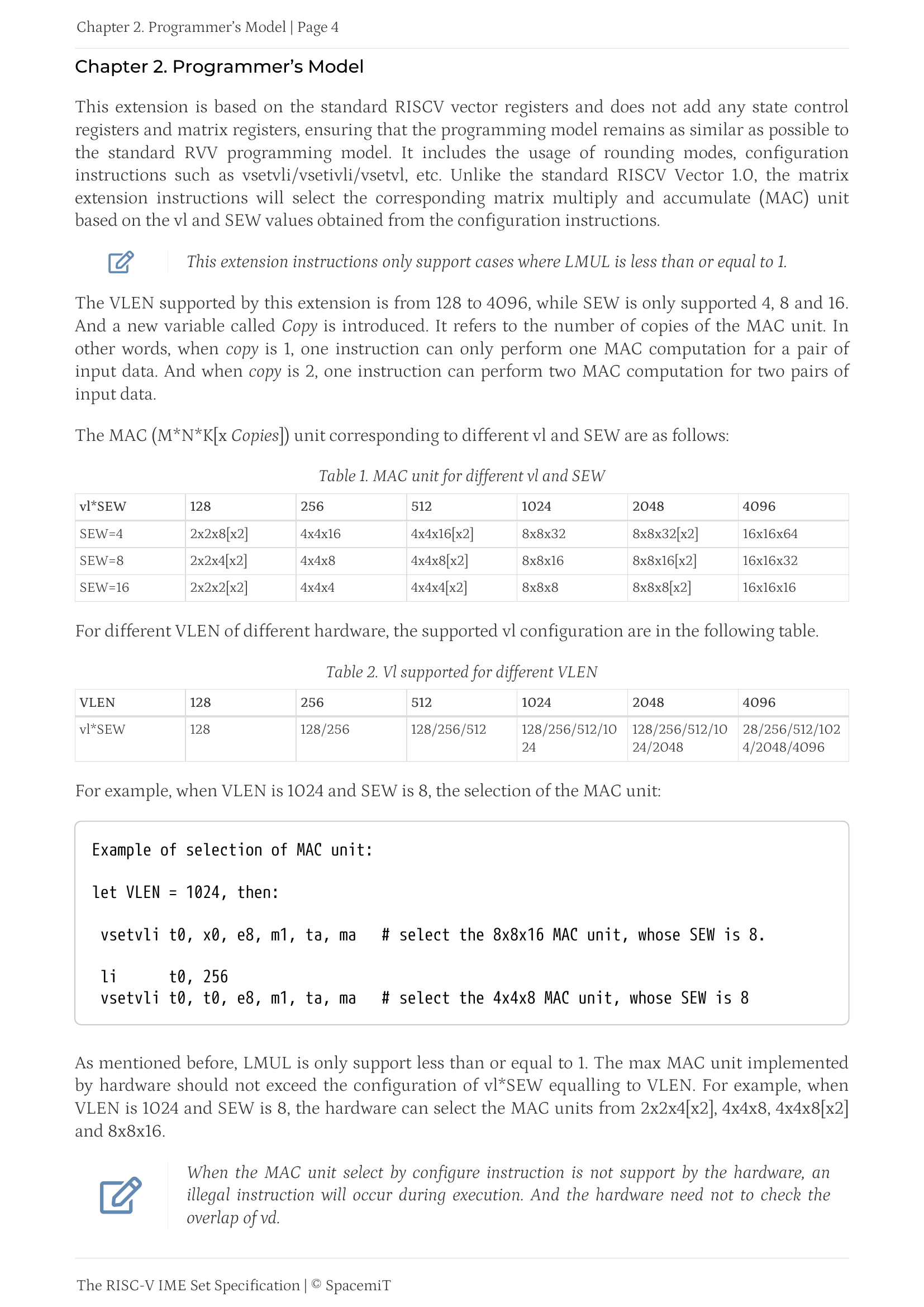
The CPU chapter in SpacemiT’s documentation gave me a few hints: the A100 cores run SpacemiT-IME (Inference Matrix Engine), a set of custom RISC-V vector extensions for quantised matrix arithmetic, with a programming model that gave me a bit of a flashback to my FORTRAN and VAX days–matrices in registers, explicit tiling and core synchronisation–but as a crash course in what RISC-V vector extensions can actually do, it made for a fun read.
The short version, if you’re in a hurry, is that this is a “unified memory” RISCv system where the CPU itself can do some interesting quasi-GPU math:
Go-ing Places
The long version is that this is almost tailor made for go-pherence, my pet inference library. I’ve been trying to do mostly MLX-like FP16 stuff with it, but my intent is to do non-GPU stuff with it, and even though AVX2 and NEON are interesting, I was completely nerd-swiped by the idea of using this RISC-V RVV variant to do “proper” inference.
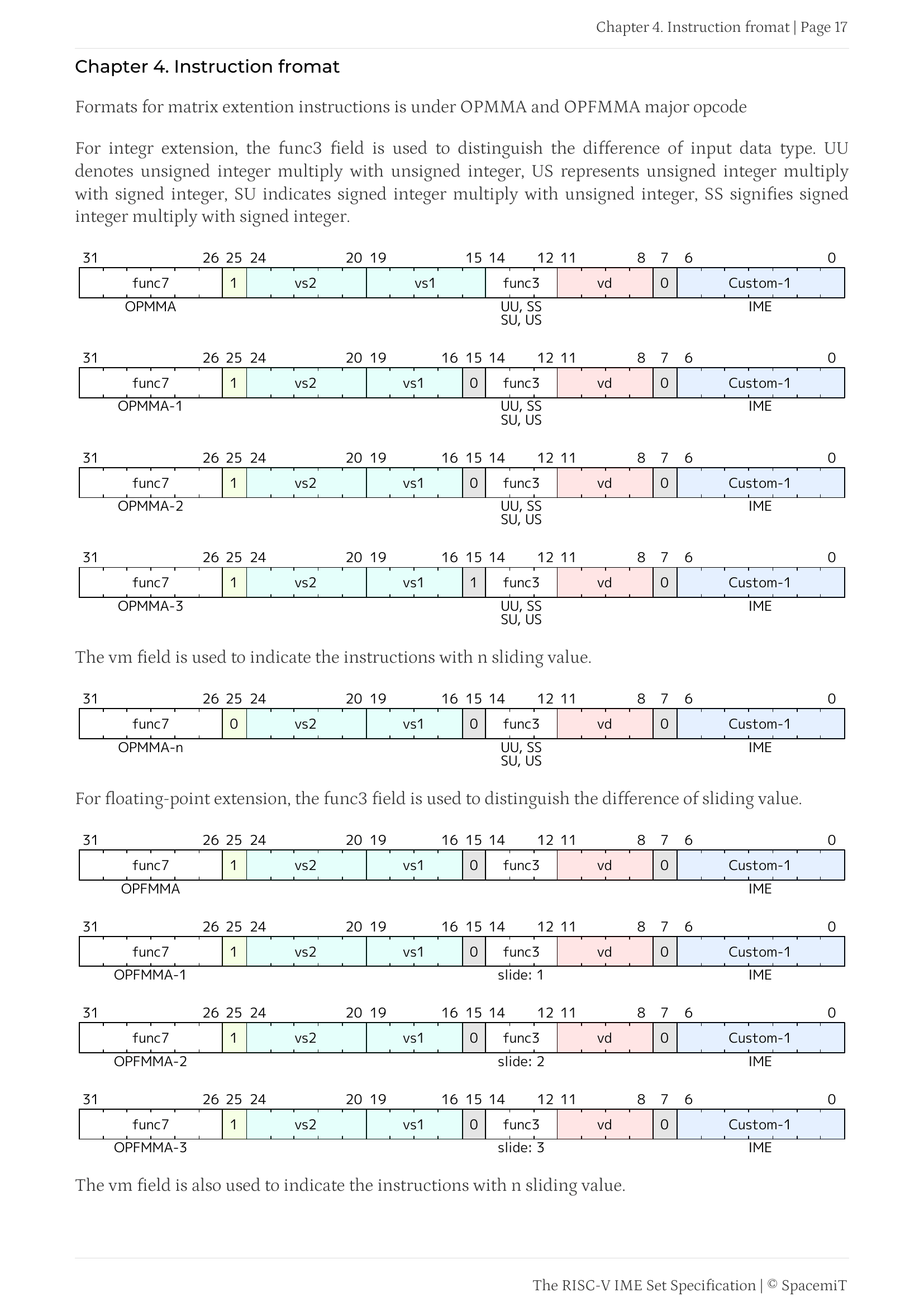
And Codex was able to sort out how to map this to useful steps and identify parts of the instruction set that could do just that:
The custom instructions (
vmadotsu.hp,vmadotu.hp,vnpack4.vv,vupack.vv,vpack.vv) perform fused int4×int8 dot products with FP16 accumulation. Eachvmadotdispatch processes 128 bytes of activation against 512 bytes of 4-bit weights, producing 32 partial results. The data layout treats VS1 as copies×(M, K) matrices and VS2 as copies×(K, N) matrices, with the result stored across VD(L) and VD(H).
The “hard” part was to map this to Go assembler, but, again, Codex had no trouble churning out code for vector operations by just lining up the right bits:
// func rvvMulVecVec(a *float32, b *float32, out *float32, n int)
TEXT ·rvvMulVecVec(SB), NOSPLIT, $0-32
    MOV  a+0(FP), X10
    MOV  b+8(FP), X11
    MOV  out+16(FP), X12
    MOV  n+24(FP), X13
    WORD $0x012072d7            // vsetvli t0, zero, e32, m4, tu, mu
loop:
    BEQ  X13, X0, done
    WORD $0x0126f2d7            // vsetvli t0, a3, e32, m4, tu, mu
    WORD $0x02056007            // vle32.v v0, (a0)
    WORD $0x0205e207            // vle32.v v4, (a1)
    WORD $0x92021057            // vfmul.vv v0, v0, v4
    WORD $0x02066027            // vse32.v v0, (a2)
    SLL  $2, X5, X6
    ADD  X6, X10, X10
    ADD  X6, X11, X11
    ADD  X6, X12, X12
    SUB  X5, X13, X13
    JMP  loop
done:
    RET
All it needed was this page (and a couple of others):
TCM (Tightly Coupled Memory)
I had some trouble figuring out how this mapped to the TCM memory device that I had found, but a few more pages into the ISA doc it became clear:
TCM is 3 MB of on-chip SRAM (8 × 384 KB blocks), meant as a low-latency scratchpad for the IME2 matrix engine. According to the docs, both sets of cores can access it in pairs:
- From the X100 cores (VLEN=256), TCM reads at 1.14 GB/s (uncacheable device memory)
- From the A100 cores (VLEN=1024), it reads at 5.4 GB/s via a direct SRAM path for wide vector loads
This is a pretty dramatic difference from the RAM bandwidth I measured earlier, and even more so if you consider that the A100 cores can access it four times faster than X100 cores. And there’s more:
- Cores are organised in pairs sharing TCM blocks, so they can exchange results much faster
- I later found that SpacemiT’s own reference code uses paired-worker barriers to overlap DMA (weight prefetch from DRAM into TCM) with compute on the partner core
If you’ve ever done double-buffering, well, this is it applied to vector compute.
Armed with this knowledge, I distilled it into a SPEC and went to town on the K3 with Codex to see if we could port some of the go-pherence SIMD inference kernels, but there was a serious kink: I couldn’t for the life of me figure out how to schedule code on the A100 cores.
Thread Scheduling Weirdness
So I asked Codex to get out Capstone and disassemble the TCM libraries. Turns out getting a thread onto the A100 cores requires a two-step handshake:
- write the thread’s TID to
/proc/set_ai_thread(a kernel interface that unlocks scheduling on cores 8–15 for that specific thread) - then call
sched_setaffinityto pin it.
Without the registration the kernel silently refuses the affinity change–those cores are fenced off from normal userspace entirely (which explains the oddities in the early benchmarking).
SpacemiT’s own llama.cpp fork (PR #22863) uses this pattern: six pthreads permanently pinned to cores 8–13, synchronised with spine_barrier_t (an atomic spinlock barrier), sitting in a persistent work loop that processes matrix tiles from a shared queue.
The workers never return to the OS scheduler between operations–barriers replace dispatch overhead entirely. I later realized that a) this is how the K3 can hit 35–40 tok/s on Qwen3-0.6B Q4_K_M b) Go scheduling has a lot more overhead.
Disassembling the ONNX runtime I’d found (SpaceMITExecutionProvider) showed it used the same cores with SPACEMIT_EP_* settings for thread count, profiling, and operator filtering.
The Actual AI Bit
So where does this leave us in terms of usable inference? Well, a lot of people like speed, and if you want speed, you can install llama.cpp-tools-spacemit 0.0.8 and run TinyLlama 1.1B Chat Q2_K (which is just 459MiB) with 8 threads:
| Test | Result |
|---|---|
Prompt processing pp128 |
137.47 ± 0.05 t/s |
Token generation tg64 |
36.60 ± 0.01 t/s |
This is pretty impressive as SBCs go, and no wonder I am starting to see YouTube videos demoing it—it fills up a screen impressively fast if you do a one-shot prompt, but is fundamentally useless.
Running Real Models
The more interesting question is whether the K3 can host a usable local coding endpoint, so I worked through a spread of current models on a fork of the SpacemiT llama.cpp tree, all at Q4_K_M with f16/f16 KV and 8 threads.
I cranked out a Pi session and had it draft a realistic agentic coding turn: a system prompt with tool definitions, a prior read tool call, the file returned as context, and a request to produce an edit tool call - roughly 700-900 prompt tokens in, 700 generated out.
The results were… Interesting. And slow to achieve, not just because of the turn times but also because I had to patch llama.cpp to match minor changes in the Bianbu libraries:
| Model | Type / active | RAM | Prefill (t/s) | Decode (t/s) | Overall† (t/s) | Turn |
|---|---|---|---|---|---|---|
| Qwen3.6-28B-REAP-A3B | MoE / A3B | 17.3 GB | 29.1 | 6.5 | 11.5 | 140s |
| Gemma 4 E4B | dense / 4B | 4.9 GB | 28.9 | 5.7 | 9.5 | 147s |
| Gemma 4 E2B QAT UD-Q4_K_XL | dense / 2B-ish | 2.5 GB | 99.6 | 12.9 | - | 18s/128 tok |
| Gemma 4 26B-A4B | MoE / A4B | 16.9 GB | 38.8 | 5.1 | 9.1 | 154s |
| Qwen 3.5-9B | dense / 9B | 5.6 GB | 22.5 | 4.5 | 8.2 | 195s |
| Gemma 4 12B | dense / 12B | 7.3 GB | 18.7 | 2.46 | 4.3 | 322s |
| Gemma 4 12B QAT UD-Q4_K_XL | dense / 12B | 6.3 GB | 25.0 | 3.6 | 4.2 | ~86s/300 tok |
†Overall = (prompt + completion tokens) ÷ total compute time - blends prefill and decode for the turn.
So yes, it can run fairly decent models, but at slightly over 2 minutes a turn, not in a usable way. That doesn’t mean it can’t run LLMs, just that it can’t run moderately serious ones at speed (still, I’m pretty sure you can stuff a smaller Qwen variant in there and do simple things like home automation).
Since I happened to be playing with a few of these models on my RTX3060 (where they work at 4-8x the speed, making them quite usable), I copied the weights across and had Codex script out the same run across them with a few variations in settings:
| Model | Note | Prefill t/s | Decode t/s |
|---|---|---|---|
| Qwen3.6-28B-REAP + ngram spec | copy-heavy task, 81% accept | 29 | 15.5 (2× peak) |
| Qwen3.6-28B-REAP @ 64K ctx | light context | 33.1 | 7.8 |
| Qwen3.6-28B-REAP @ 262K ctx | full native context | 21.5 | 9.8 |
| Qwen3 0.6B | tiny model | 293 | 55 |
| Qwen3.6-28B Q4_0 (requant) | deep 9K ctx | 21.7 | 3.5 |
| Qwen3.6-35B-REAP + MTP | non-viable on this CPU backend | - | - (stalled) |
The pattern is somewhat clear: on this memory-bandwidth-bound board, decode rate tracks 1 / active parameters – or something. Sparse mixtures-of-experts and sub-4B dense models “work”, but anything above 3B just doesn’t, really. And Multi-token prediction (MTP), which I had gotten to work pretty well on my 3060 under go-pherence, stalls completely.
Since Gemma 4 just came out (again, for what, the third time?) with QAT, I also tried both its MTP and QAT variants by patching llama.cpp a bit further (by this time I was really hooked).
And splitting the workload across core types actually “worked”: sticking drafters on the slower X100 and the rest on A100 was feasible, but… there’s no fast memory exchange between core types, so it was (verifiably) useless:
| Gemma 4 E4B run | Thread placement | Prefill t/s | Decode t/s |
|---|---|---|---|
| No drafter | target on A100 8-15 |
26.36 | 5.99 |
| Assistant MTP, 4 draft threads | drafter on X100 0-7, target on A100 8-15 |
26.35 | 5.99 |
| Assistant MTP, 8 draft threads | drafter on X100 0-7, target on A100 8-15 |
26.30 | 5.97 |
QAT
Gemma 4 E2B QAT was, however, “useful”, for a rather slow definition of it (~13t/s), and it is technically multimodal, but on the K3… not usable either. I tossed a 224×224 test image into it, which took roughly 39–47 seconds just to process through the projector, and even though it could identify a solid red square an equally simple red square/blue circle image came back as “yellow and white”. Might be my code, but by this time I had already started eating into my vacation days and I decided to call it quits.
The numbers are interesting, though, and make me wonder what a K3-like CPU can do with other kinds of models:
| Model / route | Params (M) | RAM / file | Prefill t/s | Decode t/s | Notes |
|---|---|---|---|---|---|
| Qwen 3 0.6B | 596 | 373 MB | 37.5 | 43.5 | Great demo, zero substance |
| Gemma 4 E2B QAT | 4,630 | 2.5 GB | 99.6 | 12.9 | decent prose/code without toy-model speedups; can use tools, will keep it around |
| Qwen3.6-28B-REAP-A3B | 28,240 | 17.3 GB | 28.9 | 7.15 | quality anchor; large context and actual coding |
| Gemma 4 E4B | 7,520 | 4.9 GB | 27.5 | 6.01 | twice as big as E2B, and twice as slow |
| Gemma 4 12B QAT UD-Q4_K_XL | 11,910 | 6.3 GB | 25.0 | 3.6 | sort of worked, but unusable |
In practice, none of the model, quant, or speculative tricks break the ~7 t/s decode wall for genuinely useful generation on the quality models, and we’re stuck shuffling ~3B of active weights per token out of LPDDR.
I was able to get very close to the C numbers with the E2B QAT, so I will be playing with that a bit more–in fact, I think that the Gemma 4 models are the most interesting thing out there if, like me, you’re stuck with an RTX 3060 and a 36GB RAM M3 Mac as your top inference hardware…
Where This Leaves Me
I am quite taken by the K3, to the point where I just got Whisper going on it using go-pherence and am now trying to shoehorn various other things into it, but the summary is as follows:
- Software maturity is surprisingly good – Bianbu 4.0 has a modern kernel (6.18), modern tooling, and has had zero papercuts (so far). This is not the “barely boots” RISC-V experience from two years ago, when Go barely worked out of the box on
riscv64without a full rebuild. And no, I didn’t try Rust yet, but I will, eventually. - Thermals are well-managed – never exceeded 68°C even under sustained 16-core load, fan ramps smoothly and is much quieter than the CIX P1.
- The shipping storage is great – NVMe-class speeds from the onboard UFS (didn’t feel the need to add an NVMe), no SD card in sight
- GPU and video decoding story is better than expected – PowerVR Vulkan 1.3 and hardware decoding both work out of the box.
- The “normal” CPU cores (and memory bandwidth) are middling – per-core IPC is roughly half an A720, but the A100 RVV sort of makes up for it.
And even if it can’t do “real” LLMs, I am pretty sure the K3 can handle standard image recognition swimmingly. YOLOv5 has just come out even as I am putting this post together, so I haven’t tested it, but the key thing is that RISC-V is really interesting as a CPU platform now (at least for me). Of course, it has to come with enough RAM (and those 32GB RAM are probably the bare minimum any AI SBC should have for any realistic use), and times are tough, but I look forward to testing its descendant(s).
Right now I’ve embarked on the rather quixotic quest of getting Ideogram 4 on it (and yes, I know it won’t really “work”, but I wanted to have a go and have another “working” implementation besides the RTX back-end), and I expect I will spend a bit of time trying to tweak Qwen or Gemma 4 on it to see if I can have a permanent “house LLM” that doesn’t suck and can do basic automation (even if slowly) – and I’ll update this post (or add a link to it at the bottom) with any positive results.