 Rui Carmo
Since last week, I’ve been heads-down building a coding agent setup that works for me and using it to build a bunch of projects, and I think I’ve finally nailed it. A lot more stuff has happened since then, but I wanted to jot down some notes before I forget everything, and my next weekly post will probably be about the other projects I’ve been working on.
Seizing The Means Of Production
I have now achieved coding agent nirvana–I am running several instances of my agentbox code agent container in a couple of VMs (one trusted, another untrusted), and am using my textual-webterm front-end to check in on them with zero friction:
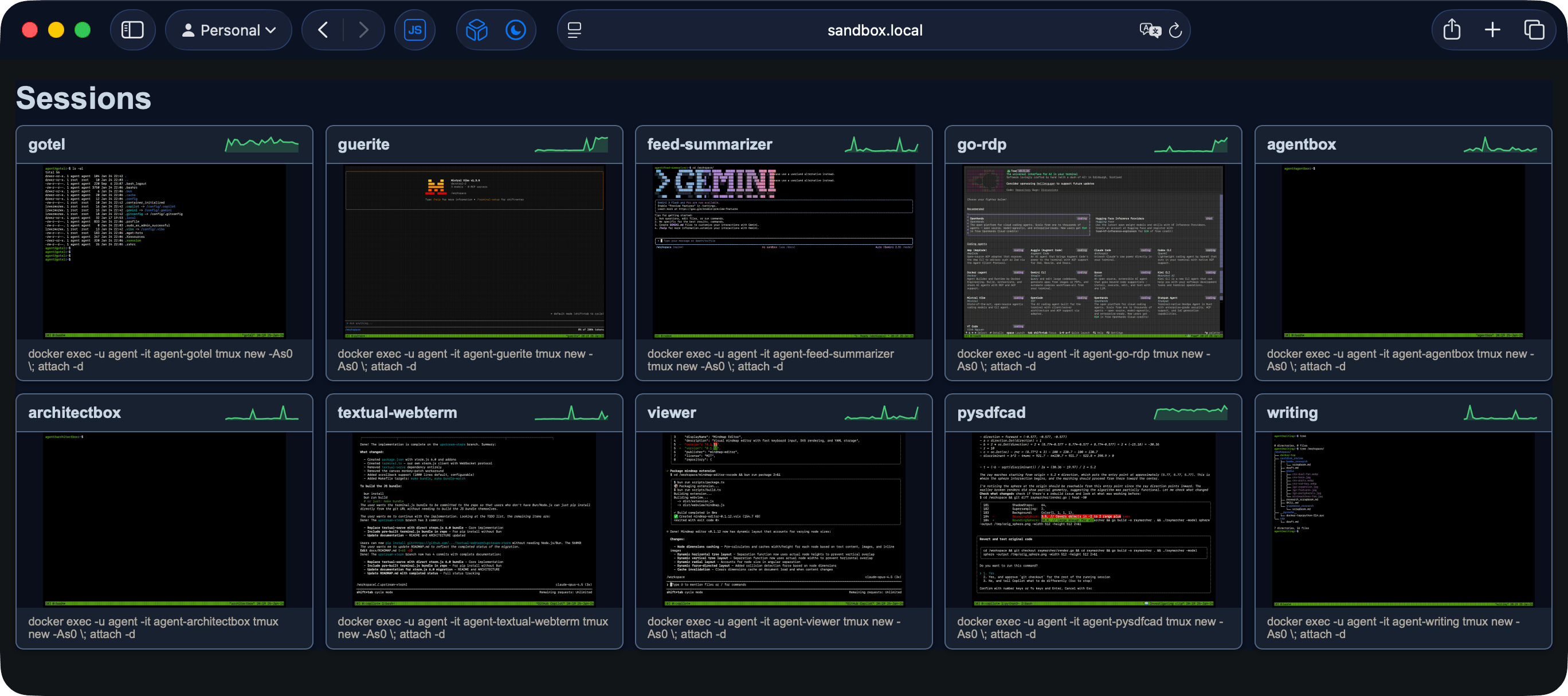
This is all browser-based, so one click on those screenshots (which update automatically based on terminal activity) opens the respective terminal in a new tab, ready for me to review the work, pop into vim for fixes, etc. Since the agents themselves expend very little CPU or RAM and I’ve capped each container to half a CPU core, a 6-core VM can run literally dozens of agents in parallel, although the real limitation is my ability to review the code.
But it’s turned out to be a spectacularly productive setup – a very real benefit for me is having the segregated workspaces constantly active, which saves me hours of switching between them in VS Code, and another is being able to just “drop in” from my laptop, desktop, iPad, etc.
As someone who is constantly juggling dozens of projects and has to deal with hundreds of context switches a day, the less friction I have when coming back to a project the better, and this completely fixes that. Although I had this mostly working last week, getting the pty screen capture to work “right” was quite the pain, and I had to guide the LLM through various ANSI and double-width character scenarios–that would be worth a dedicated post on its own if I had the time, but anyone who’s worked with terminal emulators will know what I’m talking about.
You Wanted Sandboxing? You Got Sandboxing
Another benefit of this approach is that none of the agents are running locally and can’t possibly harm any of my personal data.
The whole thing (minus Tailscale, which is how I connect everything securely) looks like this:

I have several levels of sandboxing in place:
- Each container is an
agentboxinstance with its own/workspacefolder - Containers are capped in both CPU and RAM (although that only impacts their ability to run builds and tests–but even Playwright testing works fine)
- The containers are running in a full VM inside Proxmox (capped at six cores and 16GB) and one of my ARM boards (more cores, but just 8GB of physical RAM)
- The “untrusted” agents use LiteLLM to access Azure OpenAI, so they never have production keys and can be capped in various ways
- Each setup runs a SyncThing instance that syncs the workspace contents back to my Mac so I can do final reviews, testing and commits–that’s the only way any of the code reaches my own machine.
As to the actual agent TUI inside the agent containers, I’m using the new GitHub Copilot CLI (which gives me access to both Anthropic’s Claude Opus 4.5 and OpenAI’s GPT-5.2-Codex models), Gemini (for kicks) and Mistral Vibe (which has been surprisingly capable).
After last week’s shenanigans I relegated OpenCode to the “untrusted” tier, and I also have my own toy coding assistant (based on python-steward, and focused on testing custom MCP tooling) there.
KISS
A good part of the initial effort was bootstrapping this, of course, but since I did it the UNIX way (simple tools that work well together), I’ve avoided the pitfall of doing what most agent harnesses/sandboxing tools are trying to do, which is to do full-blown, heavily integrated environments that take forever to set up and are a pain to maintain.
I don’t care about that, and prefer to keep things nice and modular. Here’s an example of my docker compose file:
---
x-env: &env
  DISPLAY: ":10"
  TERM: xterm-256color
  PUID: "${PUID:-1000}"
  PGID: "${PGID:-1000}"
  TZ: Europe/Lisbon

x-agent: &agent
  image: ghcr.io/rcarmo/agentbox:latest
  environment:
    <<: *env
  restart: unless-stopped
  deploy:
    resources:
      limits:
        cpus: "${CPU_LIMITS:-2}"
        memory: "${MEMORY_LIMITS:-4G}"
  privileged: true # Required for Docker-in-Docker
  networks:
    - the_matrix

services:
  syncthing:
    image: syncthing/syncthing:latest
    container_name: agent-syncthing
    hostname: sandbox
    environment:
      <<: *env
      HOME: /var/syncthing/config
      STGUIADDRESS: 0.0.0.0:8384
      GOMAXPROCS: "2"
    volumes:
      - ./workspaces:/workspaces
      - ./config:/var/syncthing/config
    network_mode: host
    restart: unless-stopped
    cpuset: "0"
    cpu_shares: 2
    healthcheck:
      test: curl -fkLsS -m 2 127.0.0.1:8384/rest/noauth/health | grep -o --color=never OK || exit 1
      interval: 1m
      timeout: 10s
      retries: 3

  # ... various agent containers ...

  guerite:
    <<: *agent
    container_name: agent-guerite
    hostname: guerite
    environment:
      <<: *env
      ENABLE_DOCKER: "true" # this one needs nested Docker
    labels:
      webterm-command: docker exec -u agent -it agent-guerite tmux new -As0 \; attach -d
    volumes:
      - config:/config
      - local:/home/agent/.local
      - ./workspaces/guerite:/workspace

  go-rdp:
    <<: *agent
    container_name: agent-go-rdp
    hostname: go-rdp
    ports:
      - "4000:3000" # RDP service proxy
    labels:
      webterm-command: docker exec -u agent -it agent-go-rdp tmux new -As0 \; attach -d
    volumes:
      - config:/config
      - local:/home/agent/.local
      - ./workspaces/go-rdp:/workspace

# ... more agent containers ...

volumes:
  config:
    driver: local
    driver_opts:
      type: none
      o: bind
      device: ./home
  local:
    driver: local
    driver_opts:
      type: none
      o: bind
      device: ./home/.local

networks:
  the_matrix:
    driver: bridge
You’ll notice the labels, which are what textual-webterm uses to figure out what containers to talk to.
The Outputs
It’s been insane. Since this setup lets me drop back into each project at the click of a link and I can guide the agents for a couple of minutes at a time, or take notes and write specs in a separate tmux window. Either of which fits well with my workflow and doesn’t require me to fire up a bloated IDE and loading a project folder (which can take quite a long time on its own).
So I now have the ability to create a bunch of things that I think should exist:
- I now have my web-based RDP client working with a Go back-end that uses
tinygoand WASM to do high-performance decoding in the browser (which is something I’ve always wanted), and I decided to push it to the limit against the public test suites because I think a Go-based RDP client is something that should exist. - I took the existing pysdfCAD implementation of signed distance functions and replaced the slow marching cubes implementation it was using to render STL meshes with a Go-based backend that renders meshes much faster and with better quality (when it works–I need to sort out some bugs).
- I built two (for now) Visual Studio Code extensions for mind-mapping and Kanban that match what I currently need from Obsidian (and will be looking at enhancing Foam to match the Obsidian editor soon)
- I’m taking a couple of years of hacky scripts and building a
writingagent that is going to help me do the automated conversion and re-tagging of the 4000+ legacy pages of this site that are still in Textile format (the nameeditoris taken for building a WYSIWYG Markdown editor to replace Obsidian with VS Code) - I ported a bunch of my own stuff (and a few fun things, like Salvatore Sanfilippo’s embedding model) to Go.
- I started packaging my own MCP servers as Azure App Services, so I can use the basic techniques to accelerate my day job.
Lessons Learned
I’ve read about the Ralph Wiggum Loop, and it’s not for me (I find it to be the kind of thing you’d do if you’re an irresponsible adolescent rich kid with an inexhaustible supply of money/tokens and don’t really care about the quality of the results, and that’s all I’m going to say about it for now).
- My key workflow (write a
SPEC.md, instruct the agents to run full lint/test cycles and aim for 80% test coverage, then go back, review and writeTODO.mdfiles for them to base their internal planning tools out of and work in batches) still works the best as far as final code quality is concerned. I still have to ask for significant refactorings now and then, but since my specs are usually very detailed (what libraries to use, which should be vendored, what code organization I want, and what specific test scenarios I believe to be the quality bar) things mostly work out fine. - Switching between models for coding and auditing/testing is still key.
Claude(evenOpus) has a tendency to be overly creative in tests, so I typically ask for test and security audits withGPT-5.2that catch dozens of obviously stupid things that the Anthropic models did. Gemini is still a grey area, since I’m just using the free tier for it (although it seems unsurprisingly good at architecting Go packages). - Switching between frontier and small(ish) models for coding and testing also works great.
gpt-5-mini,sonnet,haiku,mistralandgemini flashdo a very adequate job of running and fixing most test cases, as well as front-end coding. - SyncThing really doesn’t like when agents create
virtualenvsor installnpmpackages, so I routinely have to tell the agents that they are in a containerized environment and that it’s fine to installpipandnpmpackages globally (i.e., outside the workspace mount point). - Like I wrote a little while back, MCP is still the way to go for deterministic results with tools. Support for MCP (and
SKILL.md) is very uneven across all the current agentic TUIs, but with a few strategically placed symlinks I can have a workspace setup that works well across VS Code and the remote agents. - Having a shared set of MCP tooling and skills across as many of your agents as possible really cuts down on the amount of prompting and scaffolding agents need to create per project. In that regard,
umcphas probably been the best bang for the buck (or line of code) that I wrote in 2025, because I use it all the time. - Claude Code and Gemini have a bunch of teething issues with
tmux. Fortunately both Mistral Vibe and the new Copilot CLI work pretty well, and clipboard support is flawless even when using them inside bothtmuxandtextual-webterm.
And, finally, coding agents are like crack. My current setup is so addictive I find myself reviewing work and crafting TODOs for the agents from my iPad before I go to bed instead of easing myself into sleep with a nice book, which is something I really need to put some work into.
But I have a huge, decades-long list of ideas and projects I think should exist, and after three years of hallucinations and false starts, we’re finally at an inflection point where for someone with my particular set of skills and experience LLMs are a tremendous force multiplier for getting (some) stuff done, provided you have the right setup and workflow.
They’re still very far from perfect, still very unreliable without the right guardrails and guidance, and still unable to replace a skilled programmer (let alone an accountant, a program manager or even your average call center agent), but in the right hands, they’re not a bicycle for the mind–they’re a motorcycle.
Or a wingsuit. Just mind the jagged cliffs zipping past you at horrendous speeds, and make sure you carry a parachute.