 Rui Carmo
A few days ago, being intrigued by Postbox, I gave it a whirl on my Mac. This because I have gotten rather used to Xobni in Outlook, and I’ve been searching for something similar for home use.
The Related Mail plug-in is nice but doesn’t do most of what I want (that being getting more information on contacts and attachments) and Shelf, despite being brilliant and extensible in Python, hasn’t (yet) reached a point where it can do what I want (nor do I have the time to contribute to it these days), so I’m still looking.
But despite Postbox being nice and polished, I somehow didn’t find it compelling enough for me to switch from years of Mail.app ~~abuse~~habit.
Still, that doesn’t mean that I can’t use it when I’m on something other than on the Mac. Thunderbird (my usual alternative MUA) has an utterly asinine UI design that wastes vertical space to no end, which is more annoying when you consider that it’s otherwise damn near perfect in terms of speed and features to run on a netbook.
Postbox is based on Thunderbird to a large extent, but compensates by (nearly) fixing many of the UI gripes I have with it, so I decided to give it a whirl on my 901.
Trouble is, I’m still running Ubuntu on it, and my patience for reinstalling the whole thing (even despite last week’s fracas concerning Citrix) is nil. And Postbox has no Linux version.
So I decided to reinstall WINE and have a go at it. Installing Postbox was a breeze, but it refused to run - and, to my surprise, it turned out to require .NET 2.0 (and hence the latest bleeding-edge version of WINE).
Once I installed both1, however, it worked fine:
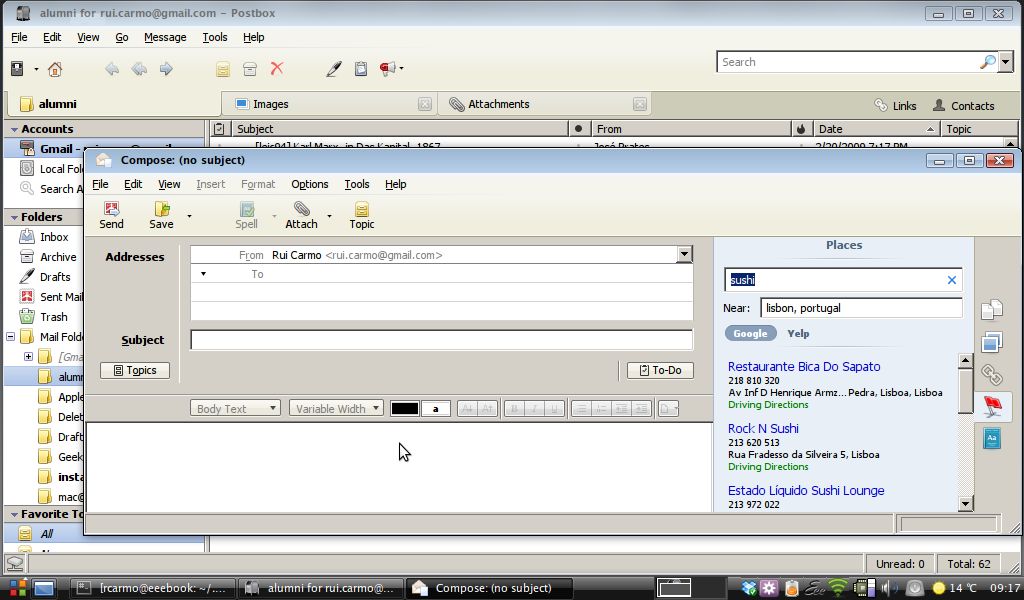
I have (as yet) found no real issues with it running in this way, although there is the usual visual flakiness associated with WINE apps running under compiz (slow redraws and flickering animations on occasion)2.
Indexing and searching work (as does everything I’ve tried so far), and were it not for the fact that Postbox does not have a very clear roadmap, I would be very tempted to adopt it for regular use.
Let’s wait and see what comes of it. In any case, now you know you can try it out under Linux and make up your own mind.
REGEDIT4

[HKEY_CURRENT_USER\Control Panel\Desktop]
"FontSmoothing"="2"
"FontSmoothingType"=dword:00000002
"FontSmoothingGamma"=dword:00000578
"FontSmoothingOrientation"=dword:00000001
-
Mind you, the .NET 2.0 runtime may appear not to install correctly. Mine complained, and yet it worked. ↩︎
-
In case you’re wondering about the font smoothing (which goes a long way toward making it tolerable), it’s a new WINE feature as of 1.1.3 (or so), and you can get it by importing this registry file with
regedit: ↩︎