 Rui Carmo
Around early February, I got a little extra something in the mail: An Orange Pi Zero 3, which is (yes, you guessed it) yet another single-board computer–not based on the RK3588, but on the AllWinner H618 SoC, which is a lower end quad-core ARM Cortex-A53 running at 1.5GHz:
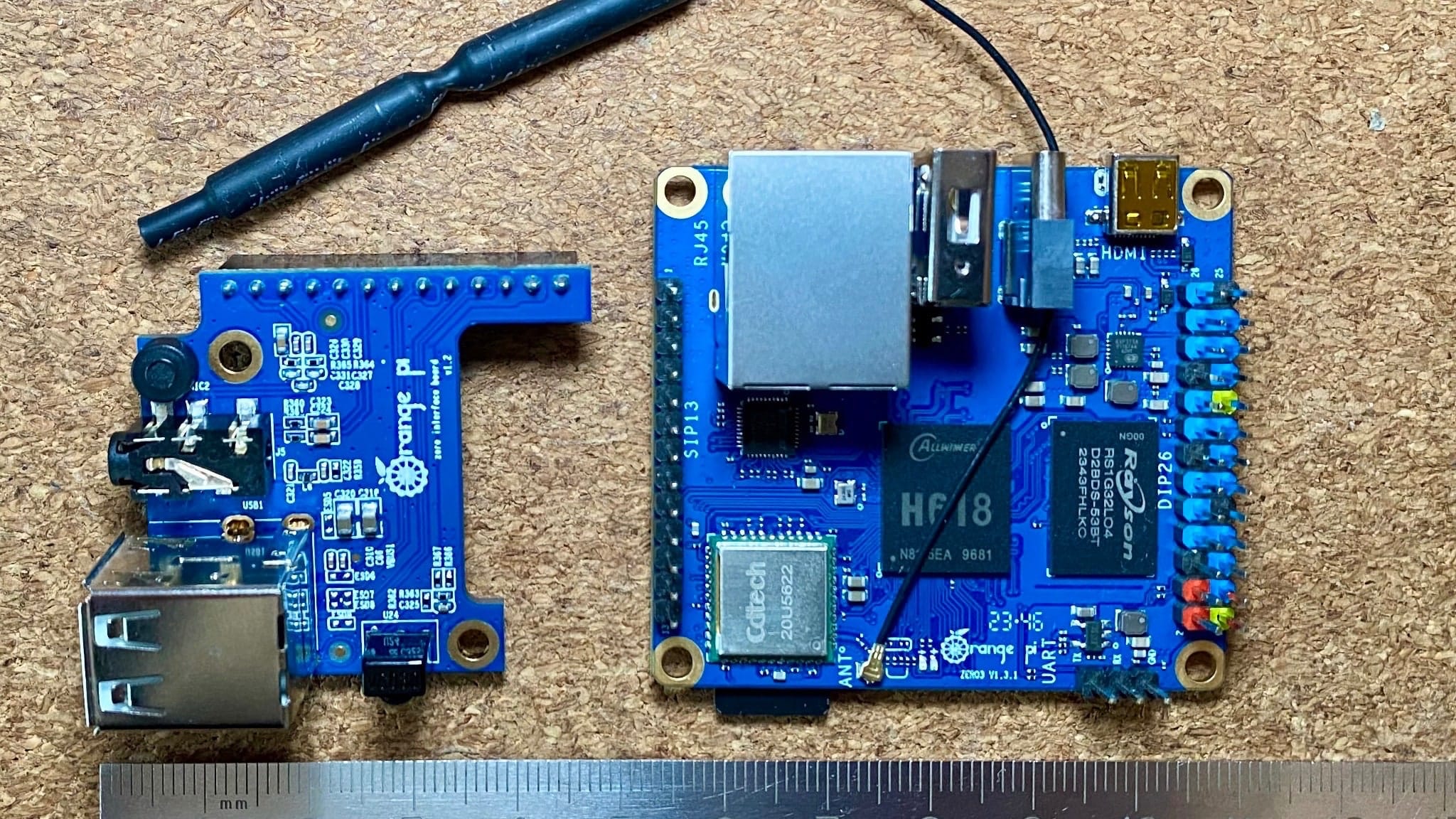
Disclaimer: Orange Pi sent me a review unit (for which I thank them), and this article follows my Review Policy.
Hardware Specs
The Zero 3 is a bit of an odd duck, but with a few interesting features:
- 4GB of
LPDDR4RAM - A Gigabit Ethernet port
USB-Cfor power
I quite like to see Ethernet ports in smaller SBCs, since it makes them more useful as thin clients, and the generous RAM allocation is also a plus for a board this size. The rest of the specs are a mix of the usual and the unusual:
- AllWinner
H618SoCwith 4xCortex-A53 cores running at 1.5GHz and a Mali G31 MP2GPU. - An on-board single-die
20U5622Wi-Fi/Bluetooth module that supports 802.11ac at 5GHz and Bluetooth 5.0 (a pigtail antenna is supplied) - a micro-
HDMIport (which is a bit of an annoyance, but I have a few cables for that) - An
SDcard slot (which is all you get for storage, since there is noEMMCon this board) - a 26-pin
GPIOheader (which is also a bit of an oddity, but is documented on their wiki) - A 13-pin header for an optional daugherboard (which I also got) with:
- Two additional
USB-Aports (it has one on the main board) - A 3.5mm audio jack
- A microphone
- An IR receiver
- Two additional
Given the mixing and matching that is going on in the BOM, I suspect this board (or its ancestors) was originally designed for use in a set-top box and re-purposed for the maker market by replacing an EMMC with a card slot, but that’s just a hunch.
Software Support
As usual, getting stable, maintainable software was a bit of a challenge. While fiddling with the board I realized that it booted into a mini-userland saved to SPI flash when no card was present (which has interesting implications for field service and is something I’d like to see more often), but booting a full OS has to be done from an SD card.
As to Linux distributions, it took me a while to actually get around to testing it, for two reasons:
- I really wanted to flash Android, and that was a bit of a rabbit hole (more on that below).
- The board is not officially supported by Armbian, nor is there a “vanilla” Debian CLI image for it (which I would have preferred).
Not the droid you are looking for
On the Android front, things are just… strange. To flash the official image to an SD card, you need to use an extraordinarily specific Windows tool (you read that right, it does something to the partitioning scheme that apparently can’t be done with your usual dd or Mac/Linux imaging tools), and there is no real way to customize or build your own image–so after a few weeks of poking around I gave up on that–part out of principle (it’s an unmaintainable solution) and part out of frustration.
Then I went and spent a fair chunk of time searching for a way to get a Linux image I could easily maintain or upgrade, and things were better, but still far from perfect.
An Armbian and a Leg
There are unofficial Armbian images available, but even though the wiki had quite a bit of documentation, it took me a while to realize I had to use specific system images for the 4GB RAM version of the board.
And, you guessed it, there were no prebuilt ones. This is apparently due to the need of having specific DTB files for uboot depending on board version, and instructions for patching the images were a bit hard to find (they are in Chinese, which I personally don’t really mind, but by that time I was already out of time).
So, in short, the software situation is a bit… complicated. And for folk like me, who are used to embedded systems and can boot their own kernels, Orange Pi does have build instructions for building a Linux 6.1 kernel on GitHub.
But since at the time I was already trying to backport an RK3588 kernel to Armbian, I just didn’t have the time to deal with another SoC and its quirks.
“Official” Debian
I eventually flashed the official Debian desktop image onto a 32GB SD card, and even though the system booted to a US English locale, I still had to do a few changes:
- Remove the
huaweicomrepository fromaptsources, because, well… I’d rather update from other places, or use geo-distributed mirrors. - Change the default terminal back to
xfce-terminal, because (as usual in Chinese distributions) the default terminal is picked due to its ability to display Hanzi. - Remove a bunch of similarly-handpicked utilities, and install
firefox-esras a browser since it was lighter than Chromium. - Set up
avahi-daemonandnss-mdnsto be able tosshinto it usinghostname.localand discover my other machines on the network.
I was also pleasantly surprised by orangepi-config, which is pretty feature-packed:
Power Consumption
Running Debian, I measured the bare board at the USB-C port, and saw it taking in a maximum of 2.2W while booting without anything connected, and idling at 0.8W in the same situation.
Plugging in a keyboard and mouse bumped these by almost 1W, and adding Ethernet another 0.3W.
With a monitor, keyboard and mouse plugged in, it was taking in a little above 2W idle, which is in line with expectations for a board with this kind of feature set.
Use Cases
With my original idea of flashing Android on it and test Moonlight alongside the Logitech G CLoud out the window, I plugged the Zero 3 into an LCD panel I have on my electronics bench and used it to look up documentation and well as a thin client to connect to my desktops.
And it worked–pretty well, really. With 4GB of RAM and a quad-core CPU, it was snappy enough to open PDFs and browse the web (as long as you don’t expect to watch a lot of video–anything over 720p was a bit sluggish):
I used it without the expansion board, since the keyboard I was using has a built-in USB hub (and didn’t need audio), and it was almost invisible thanks to its small size.
So as a thin client, yes, it does work perfectly–I had zero issues with performance over VNC or RDP on the 1080p display I was using. And I did eventually try out Moonlight as well, although clearly the Linux image I was using was not optimized for making the best out of the Mali G31 GPU:
Conclusion
The Orange Pi Zero 3 is a strange SBC. Like many, it is let down by its software support, but the only real flaw I can point to hardware-wise (within comparable boards) is the lack of an EMMC.
I would have loved to have a good, easy way to run Android on it (where the GPU would shine), but as a Linux board I see it as being more useful for thin clients and running Klipper/Octoprint alongside a 3D printer than, say, digital signage (since the video decoding is lacking), but it’s a very capable one.
It is a bit of a shame that it doesn’t ship with EMMC storage. But overall it is a capable board that can be used for a variety of purposes.
My plans for it are to (eventually) build it into a monitor (the panel on my electronics desk is just bare, literally hanging by the driver board, and I have been slowly designing a suitable enclosure). That way I can use it as a thin client, and, eventually, plug in my oscilloscope via USB.
But given its small size (it’s almost exactly the size of the now useless LCD on my KP3S Pro), I’ve also considered using it to run Klipper (although with 4GB of RAM it could probably handle two or three printers), and I suspect a lot of people will find the lower-specced boards pretty handy for that.
Another use (given its Ethernet port and low consumption) is as a home router “sidekick”–you can confidently power it off a USB port on your router and use it to run Pi-hole for ad blocking or OpenWRT for a personal VPN–which would be a nice and compact way to add those features to a home network.